Video D D Game Invitation GA109: Fast, Flexible Digital Invites
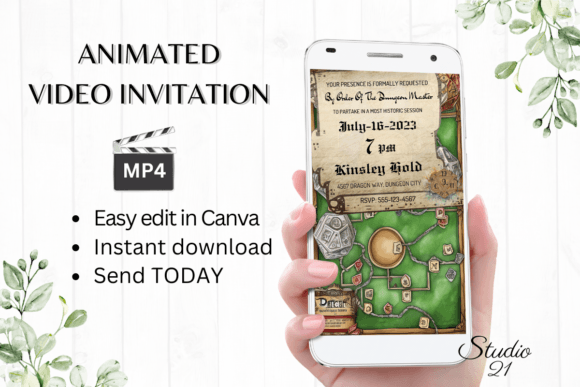
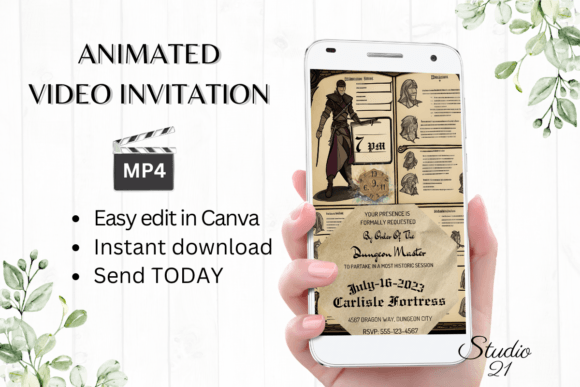
Create stunning, shareable game invitations in minutes with the Video D D Game Invitation GA109 template. Designed for quick customization and instant delivery, this digital invitation solution gives you full creative control without requiring design experience or special software. Whether you're planning a casual game night, a themed party, or a virtual event, this template adapts to your style and audience.
Why Video D D Game Invitation GA109 Stands Out
Unlike static image invites or generic text messages, Video D D Game Invitation GA109 brings your event to life with animated visuals and personalized messaging. The template is hosted in Canva, allowing you to edit directly in your browser—no downloads or installations required. This makes it ideal for creators, marketers, educators, and entrepreneurs who need a fast, professional way to promote events, contests, or game-based campaigns.
Creative Uses for Your Digital Game Invitation
Once you access the template, you're not limited to a single use case. Here are a few ways different users can adapt Video D D Game Invitation GA109:
- Event planners can use it to promote themed parties, trivia nights, or charity gaming events.
- Marketers can create engaging teaser videos for product launches or brand campaigns with a playful twist.
- Teachers and educators can invite students to interactive quizzes, game-based lessons, or online competitions.
- Bloggers and influencers can generate excitement around giveaways, challenges, or live-streamed events.
Because the template supports text, font, animation, and color customization, you can match your brand or event theme precisely. Want a retro arcade vibe? Change the fonts and colors. Need a sleek corporate look? Adjust the animation and layout for a polished feel.
How to Customize Video D D Game Invitation GA109
After purchasing the template, you'll receive a PDF with a direct link to the Canva file (1080x1920 px), optimized for mobile viewing. From there, you can:
- Edit text to reflect your event name, date, time, and details
- Add or remove text boxes for extra information or visuals
- Change fonts, colors, and sizes to match your style
- Adjust text effects like shadows, outlines, or gradients
- Switch animation styles to create dynamic transitions
- Download the final version as an MP4 video for easy sharing
You can make edits from your desktop or mobile device, making this a truly flexible tool for on-the-go creators. No waiting for proof approvals—just edit, preview, and send.
Sharing Your Animated Game Invitation
Once you've customized your Video D D Game Invitation GA109, you can download it as an MP4 file and share it instantly via:
- Text messages (SMS/MMS)
- Messenger, WhatsApp, iMessage, or Telegram
- Email with a direct video attachment or link
The vertical 1080x1920 format ensures your invitation looks great on mobile screens, where most people will view it. You can also copy a shareable link from Canva to send via email or embed on a website or landing page.
Tips for Keeping Your Invitation Clear and Effective
While the Video D D Game Invitation GA109 template is highly customizable, it's important to maintain clarity and visual consistency. Here are a few practical tips:
- Keep text concise – Focus on essential event details so viewers get the message quickly.
- Use legible fonts – Avoid overly decorative fonts that may be hard to read on small screens.
- Stick to a color theme – Choose 2–3 main colors to keep your invitation looking professional.
- Preview on mobile – Always check how your invitation looks on a phone before sharing.
- Test the animation speed – Make sure the timing allows viewers to read all the text without rushing.
These small adjustments ensure your invitation remains engaging and easy to understand across platforms.
Adapting the Template for Different Audiences
One of the biggest strengths of Video D D Game Invitation GA109 is its adaptability. Here’s how different users can tailor it for specific audiences:
- For kids' game parties – Use bright colors, playful fonts, and fun animations to capture attention.
- For professional game tournaments – Opt for sleek transitions, bold titles, and branded visuals.
- For virtual game nights – Include a QR code or link overlay to direct guests to the online event.
- For marketing campaigns – Add a call-to-action like “RSVP Now” or “Limited Spots Available” to drive engagement.
Because the template is fully editable, you can easily repurpose it for new events by changing the text, visuals, and animation—no need to buy a new template each time.
Make Your Event Stand Out with Video D D Game Invitation GA109
In a world where attention spans are short and digital communication is fast-paced, using a dynamic, personalized invitation makes a difference. With Video D D Game Invitation GA109, you get a professional-grade tool that’s easy to use, instantly editable, and designed for sharing. Whether you're organizing a game night, promoting a digital contest, or launching a creative campaign, this template gives you the flexibility to express your event’s unique vibe in a format that resonates.